WP FILE SEARCH: Front-end Media Library Search and Download Interface
WP FILE SEARCH, by MariaOik, exposes Media Library items to site visitors with a dedicated front-end search bar for document discovery. The plugin returns results in a tidy table and provides direct download links while supporting common document formats such as PDF, DOCX, and XLSX. Site administrators of educational resources, corporate libraries, and intranets gain a quick, low-friction way to let users find downloadable assets without backend access.
Unlock your creativity with Adobe Stock
Get 10 images or 1 video with a free trial
What is WP FILE SEARCH used for?
The plugin focuses on making media attachments discoverable from the public site. It bridges the back-end Media Library and the front-end by giving visitors a searchable interface for documents and files, a capability that helps when built-in WordPress search does not surface media attachments. This use case fits sites that act as document repositories, where visitors need direct download access to policy papers, handouts, and reports.
What file formats does it support and how are results shown?
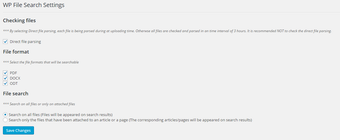
Format support targets common office documents and downloadable assets. The interface is tuned for files such as:
PDF
DOCX
XLSX
Search results appear in a clean HTML table and supply direct download links for each matching item, making it simple for visitors to retrieve the original files rather than view embedded previews.
Is it easy to add the search bar to a site?
Adding the search interface is done via a single shortcode, requiring minimal setup. Place the [wp_file_search] shortcode on any page, post, or widget area to display the search bar. The plugin is designed to work out-of-the-box with responsive themes, so the results table typically adapts to mobile layouts without extra configuration, letting administrators deploy the feature quickly.
Is WP FILE SEARCH aimed at administrators or developers?
The tool serves WordPress administrators and developers who manage document-heavy sites. It fits use cases like educational resource centers, corporate intranets, and legal or medical libraries where quick file discovery matters more than full document management features. The developer positions the plugin as a lightweight utility rather than a full document management system, and community feedback notes the solution's simplicity and effectiveness for straightforward file discovery tasks.
A practical choice for sites that need fast access to attachment files
WP FILE SEARCH is a practical option for WordPress administrators who need to expose downloadable documents to site visitors. Its trade-off is that it searches file titles and metadata only, not the internal text of PDFs or other documents, which limits discovery when users expect full-text search. Despite that constraint, the plugin suits sites that prioritise quick, low-overhead access to attachments.
Pros
Front-end search bar dedicated to Media Library items
Supports common document formats: PDF, DOCX, XLSX
Simple shortcode for placement on any page or widget area
Search results display in a clean table with download links
Cons
Does not index or search internal text inside PDF or document files
Search scope limited to Media Library entries, not full-text content
Laws concerning the use of this software vary from country to country. We do not encourage or condone the use of this program if it is in violation of these laws. Softonic may receive a referral fee if you click or buy any of the products featured here.